
What is a Proxy?
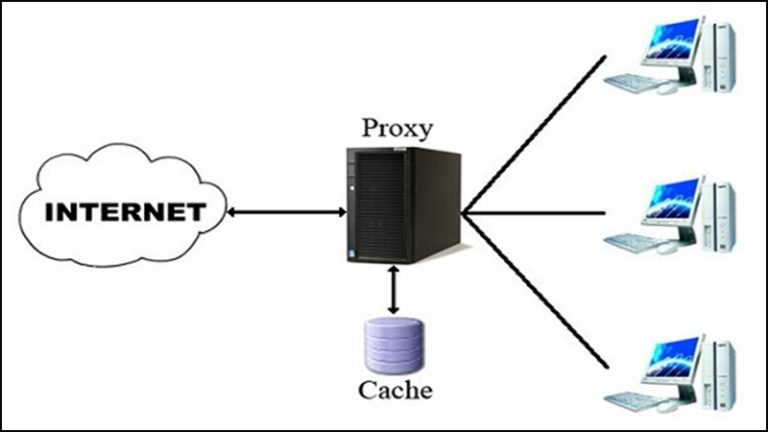
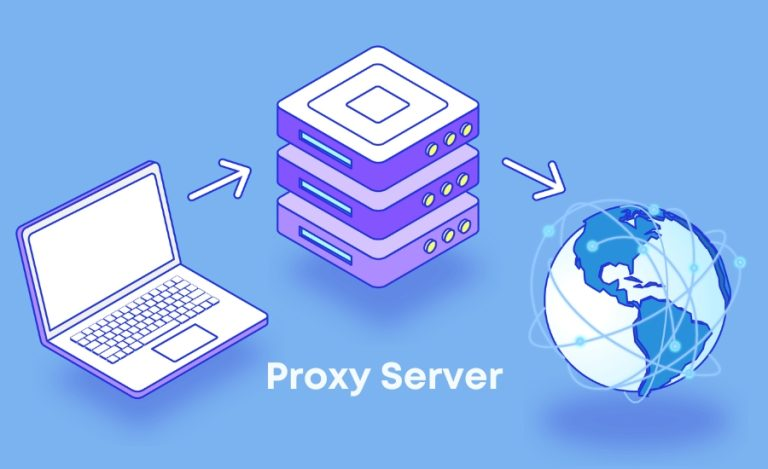
What is a Proxy? A Proxy Server, also known as a Proxy, acts as a gateway between the user and the internet. It functions as a firewall and web filter, providing security and privacy features depending on the user’s needs or the organization’s policy. When using a Proxy, all internet traffic is routed through the Proxy Server, which then sends requests to the destination addresses. This request returns to the server, and the server forwards the data from the website back to the user.
A proxy server not only transmits web requests but also helps protect data and improve network performance. It acts as a firewall and web filter, providing network connections and caching to speed up requests. Each Proxy server protects users and the internal network from threats from the internet.
Why is a Proxy Server needed?
A Proxy Server is an essential tool for both individual users and businesses due to the outstanding benefits it offers, including:
- Protecting the privacy of users and businesses, preventing external threats.
- Helping to easily access restricted or blocked resources.
- Enhancing connection speed while efficiently saving bandwidth.
- Improving security levels and controlling internet usage, especially for children (in the family) and employees (in the business).
In the digital age, protecting privacy and personal information is extremely important, and this highlights the role of the Proxy Server in ensuring that users can access the internet safely and effectively.
Types of proxy servers
There are many different types of proxy servers, each with its own characteristics and functions. Here are some of the common types:
Transparent Proxy
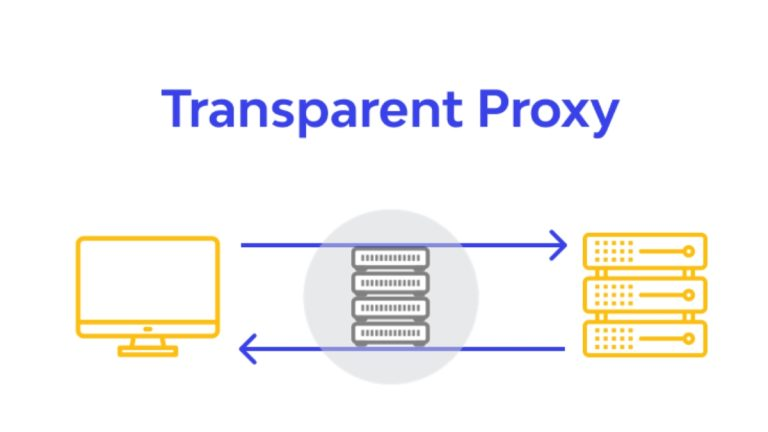
A Transparent Proxy is a type of proxy that uses the user’s own IP address to authenticate requests to access websites. This type of proxy is often used in public places such as libraries, bookstores, schools, parks, or supermarkets. The reason is that they are very easy to use for content filtering due to the simple setup between the server and the client.
Incognito Proxy (Anonymous Proxy)
An Anonymous Proxy works similarly to the incognito Browse mode you often use for personal purposes. Instead of using your IP address to access websites, an Anonymous Proxy will hide your IP. However, it still allows you to access the internet, helping to secure personal information and prevent leaving traces when visiting websites.
Browse anonymously also helps you prevent data collection by marketers, reducing the appearance of ads and marketing tricks. However, the effectiveness of this method is not always absolute, as you may still encounter ads sometimes.

Distorting Proxy
A Distorting Proxy acts as an anonymous server, replacing your real IP address with a fake one. This helps you easily access blocked websites while keeping your real location and identity private.

This type of proxy is often used in cases where you need to check a website’s accessibility from different locations without revealing the user’s real IP address.
What is a Datacenter Proxy? Comparing Residential Proxy and Datacenter Proxy
High Anonymity Proxy
A High Anonymity Proxy periodically changes your IP address when accessing web servers, making it more difficult to track and control traffic. Compared to a regular Anonymous Proxy, a High Anonymity Proxy offers a superior level of security and safety, helping you browse the web discreetly and better protect your personal information.
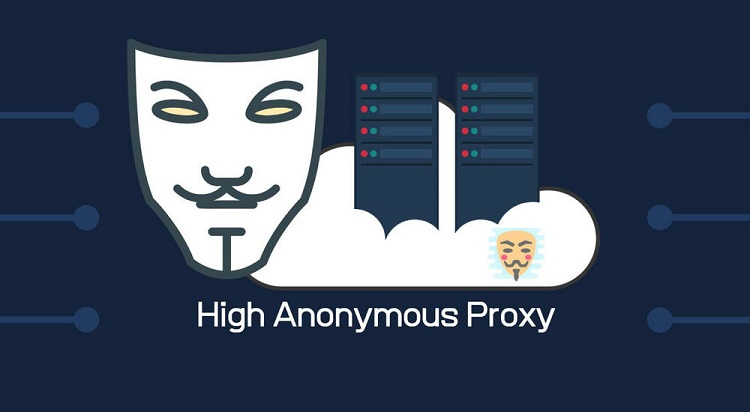
Users often choose this type of proxy when they need to protect sensitive information or perform online activities without being tracked. High Anonymity Proxies, like the TOR network, are the most private and secure method for accessing the Internet.
How does a Proxy Server work?
Every computer connected to the Internet has a unique IP address, just like your home address. Just as the post office needs to know your address to deliver mail, the Internet needs to know your device’s IP address to send data to the right place.
A Proxy Server is essentially a computer on the Internet with its own IP address that your computer can recognize. When you send a web request, it is first sent to the Proxy Server. The Proxy Server then makes the request, receives the response from the web server, and forwards the website’s data so you can view it in your browser.
The Proxy Server can change the request data when forwarding it, but still ensures the response is correct as requested. A Proxy server can hide your IP address, making it impossible for the web server to accurately determine the user’s location. At the same time, data encryption also helps to enhance security during transmission. Finally, a Proxy Server can block access to specific websites based on their IP address.
Features of a Proxy Server
In addition to forwarding internet requests, a Proxy Server also provides many other useful features. Here are some of the standout features:
Firewall and Filtering
A Proxy Server operates at the Application layer, which is Layer 7 in the OSI model, and supports application-level filtering independently. If configured correctly, it can enhance security and performance for the network.
Proxies have capabilities that ordinary firewalls cannot provide. A major benefit of using a proxy for a firewall is the ability to protect the internal network from external threats. This is very important, especially in businesses where sensitive information needs to be protected.
Connection Sharing with a Proxy Server
Sharing a connection via a Proxy Server is an effective method for expanding and optimizing internet access. Instead of providing a direct connection to each client, all connections within the internal network are routed through one or more Proxies, and then out to the internet. This helps save bandwidth and makes connection management easier.
Proxy Server and Caching
Currently, there are three main methods that Proxy Servers use to improve network service quality through Caching:
- Enhancing bandwidth and network scalability.
- Improving the responsiveness of clients.
- A Proxy Server has caching capabilities, allowing it to serve access requests even when the original data source or intermediate network connections are no longer online.
What are the practical applications of a Proxy?
A Proxy offers many significant benefits in application development. Here are some typical examples of using a Proxy in practice:
Anonymous Access
Today, many people use anonymous Proxy servers to protect their personal identity or bypass geographical restrictions on the internet. For example, Medium has blocked IP addresses from Vietnam, but you can easily bypass this by using a Proxy. An anonymous proxy helps hide the user’s real IP address, making Medium think you are accessing from the US, UK, or another country.
Additionally, if you have ever undertaken projects to collect data from large websites like Facebook or Shopee for market or customer analysis, you have certainly encountered limitations on the number of visits. These platforms often limit the number of requests you can send in a given period. A Proxy Server helps you hide your real IP address, allowing you to continue collecting data without being detected, and even bypass their limits as I have successfully tested.
What is a Dedicated Server? A Detailed Guide to Dedicated Servers
By being anonymous, you can also create fake interactions (seeding) to increase the credibility of your articles and videos, or reduce the effectiveness of competitors’ campaigns by continuously clicking on their ads.
Controlling Internet Access
In schools and workplaces, internet access can be controlled via a Proxy server. Requests from a user’s browser are forwarded to another server through the Proxy, as explained above.
Restricting access is necessary for obvious reasons: limiting employees from accessing entertainment websites during work hours, preventing the uploading of source code to cloud storage services like Google Drive or OneDrive, as well as blocking inappropriate chat applications, preventing sensitive information leaks, or blocking access to websites with potential malware.
Caching
When your website has tens of thousands of access requests per minute, using a reverse Proxy to cache frequently accessed content is an effective solution. Instead of each request having to be sent to the servers for processing, the Reverse Proxy will return the cached content, thereby speeding up the website’s response time.
SSL (Secure Sockets Layer) Encryption
Websites that use SSL/TLS encryption help establish a secure connection between the user and the website, protecting sensitive information such as bank accounts and credit cards. A Reverse Proxy can be used to manage this encryption process, thereby reducing the load on the servers, and enhancing the system’s performance and security.

What are the disadvantages of a Proxy Server?
Although a Proxy Server offers many outstanding advantages, there are also some disadvantages to be aware of. So, what are the disadvantages of a Proxy?
- Slow Speed: Although previously cached websites may see improved loading speeds through caching proxies, for new websites, a Proxy can slow down the connection.
- Unstable: Free proxies often do not guarantee stable performance. In many cases, the connection can be interrupted or disconnected suddenly.
- Unencrypted: If you use a proxy without encryption, requests sent in plain text can be easily monitored, exposing personal information like passwords and accounts. Therefore, choose proxies with encryption features to protect your information.
- Limited Functionality: A proxy can often only be applied to the entire device, not to individual applications. This can be inconvenient and difficult in some situations.
- Risk of Cyberattacks: Some Proxy servers can be exploited by hackers for malicious activities. Therefore, choosing a reputable and secure Proxy server is very important to enhance safety.
- Difficulty Integrating New Services into the System: When new services have not yet had a Proxy server installed, users should leave them outside the firewall. If these services are brought into the system, it could inadvertently reduce security and become a weak point for the server.
If we can “endure” the disadvantages of a Proxy Server and consider the benefits it brings, we will have an effective layer of protection for our system.
Should you use a Proxy Server?
A Proxy Server is an intermediary server between the user and the Internet, providing many functions such as security, content filtering, speeding up access, and hiding the user’s IP address. Although a Proxy Server offers many benefits, there are also some drawbacks. For example, they may not encrypt data, can be easily compromised or exploited by hackers, and may not be compatible with some applications. Therefore, the decision of whether to use a Proxy Server depends on your specific purpose and needs.
A Simple and Easy Guide to Installing a Free Proxy
Installing a Free Proxy is quite simple and can be done on various browsers. Below is a guide for installing it on the two most popular browsers today.
How to install a Free Proxy for Firefox?
To set up a Free Proxy for Firefox, follow these steps:
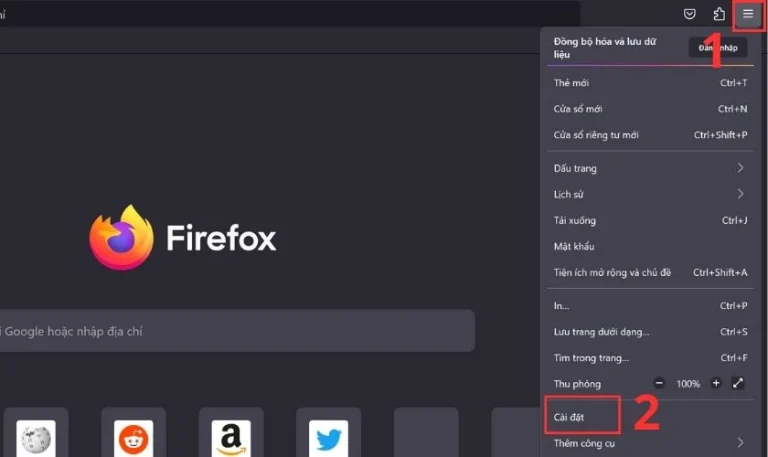
Step 1: Open the Firefox browser, then click on the three horizontal lines icon and select Settings.
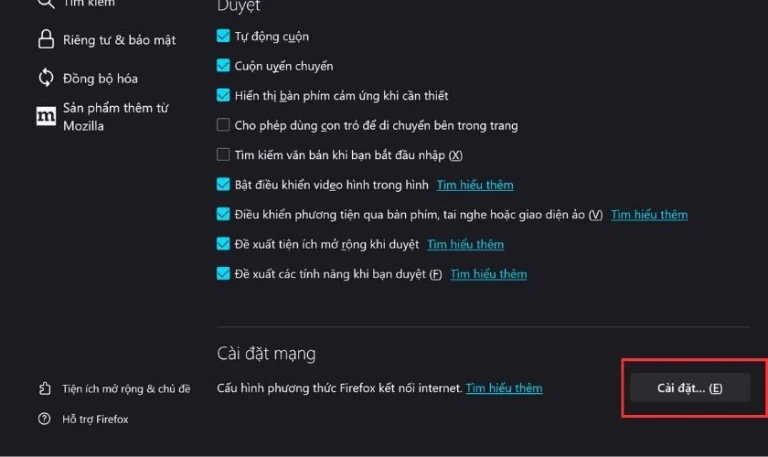
Step 2: Scroll down and select Settings… (E) in the Network Settings section.
What is an IP address? Advantages, disadvantages, and operating principles
Step 3: Next, select Manual proxy configuration. In the HTTP Proxy line, enter the IP address and Port information, then click Save.
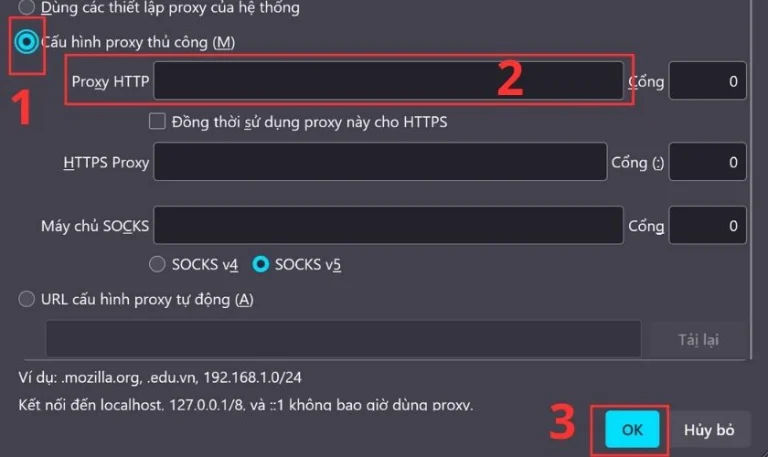
And with that, you have completed the installation of a Free Proxy for the Firefox browser!
Guide on how to install a Proxy for the Chrome browser
Similar to installing a Free Proxy for Firefox, the process for Chrome is also very simple.
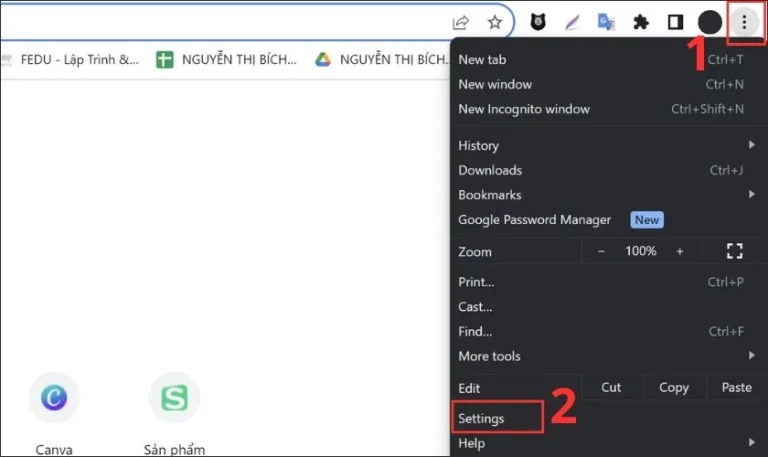
Step 1: Open the Chrome browser, then click on the three dots icon and select Settings.
Step 2: Select System and then click on Open your Computer’s Proxy settings.
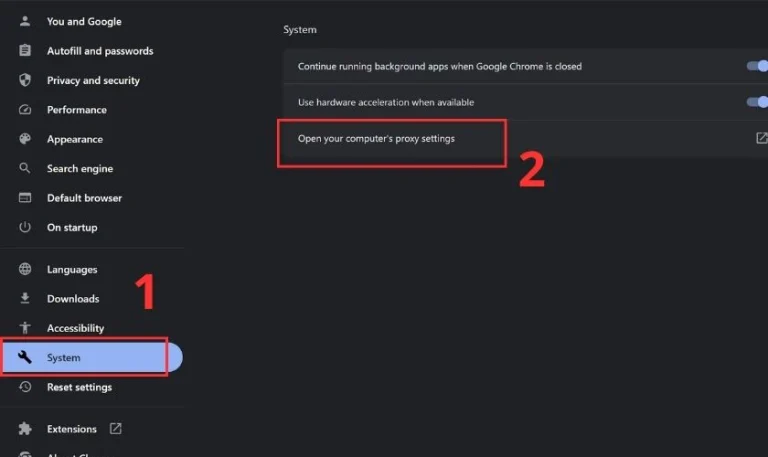
Step 3: In the Automatic detect settings section, slide the switch to the right to turn on this feature. Then, select Use setup script and slide the switch to the right to activate it. Next, enter the Proxy address in the Script address box and click Save.
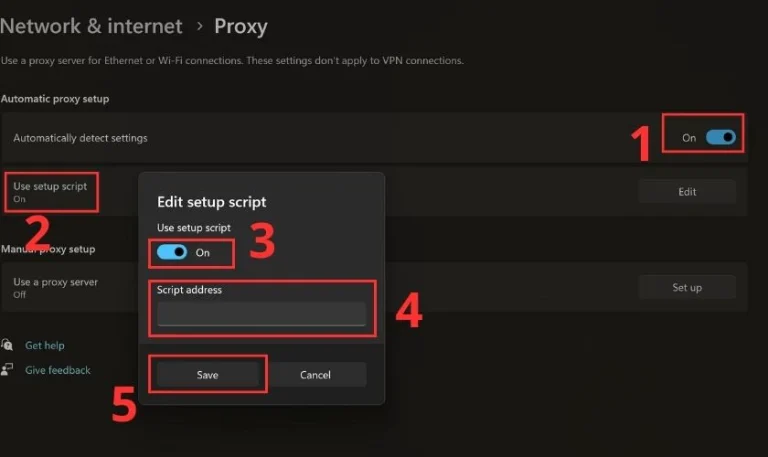
And that’s it, you have completed the installation of a Free Proxy for Chrome!
How are Proxy and NAT different?
Proxy and NAT are both common technologies widely used in computer networks today, but they have distinct differences.
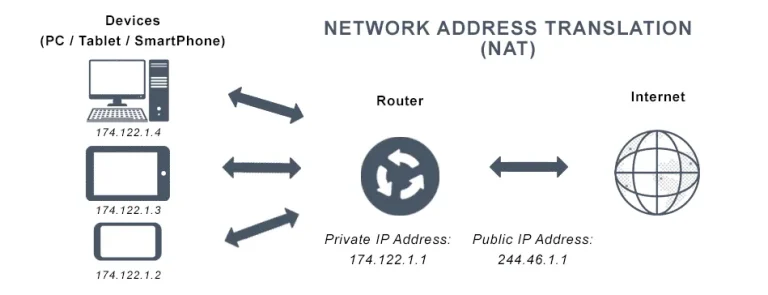
- A Proxy server represents the user’s computers when accessing other systems. It often acts as an intermediary, sending requests and receiving responses from servers on behalf of the user.
- NAT (Network Address Translation), on the other hand, changes the source IP address of traffic before it passes through the NAT and connects to the internet. It changes the IP address of packets to help devices on an internal network share a single public IP address.
- Proxy operates mainly at the transport layer (Layer 4) or higher, while NAT operates at the network layer (Layer 3) of the OSI model.
How are Proxy and VPN different?
Both Proxy and VPN are commonly used in today’s information technology era, but they have clear differences. So, what is the difference between a Proxy and a VPN?
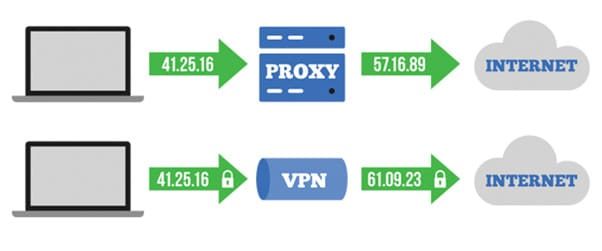
- A VPN (Virtual Private Network) creates an encrypted tunnel, providing many professional security features to effectively hide the user’s IP address. When connecting through a VPN Server, all your traffic is encrypted, protected, and ensured at a high level with a complex security system.
- A Proxy operates mainly at the browser level and often relies on security vulnerabilities to perform its tasks. In contrast, a VPN protects your entire computer system, not just the browser, but to use the full features of a VPN, you usually need to pay a fee.
How to turn off Proxy in a web browser
If you want to turn off the Proxy in your web browser, here is a detailed guide for Chrome, Firefox, Internet Explorer, and Safari:
In Google Chrome
- Step 1: Open Google Chrome, in the top right corner, click the three dots icon and select Settings.
- Step 2: In the “Network” section, select Change proxy settings.
- Step 3: Click LAN settings, in the dialog box that opens, uncheck the box “Use a proxy server for your LAN”.
- Step 4: Click OK to finish.
In Internet Explorer
- Step 1: Open Internet Explorer, select Tools and then select Internet Options.
- Step 2: Go to the Connections tab, select LAN settings.
- Step 3: In the dialog box, uncheck the box “Use a proxy server for your LAN”.
- Step 4: Click OK to turn off the proxy.
In Firefox
- Step 1: Open Firefox, click the menu (three horizontal lines), then select Options.
- Step 2: Go to the Network tab in the Advanced section.
- Step 3: In the Connection section, select Settings.
- Step 4: Select No Proxy.
- Step 5: Click OK to finish turning off the proxy.
In Safari
- Step 1: Open Safari, go to the Safari menu and select Preferences.
- Step 2: Select the Advanced tab, then click Change Settings.
- Step 3: In the LAN Network dialog, uncheck the box “Use a proxy server for your LAN”.
- Step 4: Click OK to finish turning off the proxy.
A Proxy Server is a useful tool for protecting privacy, network security, and managing internet access. However, the choice and use of a Proxy Server should be carefully considered based on needs and purpose. Hopefully, this article has given you a general overview of Proxies, from the concept of what a proxy is, its benefits, to related issues, so you can make an informed decision in using this technology.
Where to get Proxy services
You can currently buy a Proxy at ALGO Proxy with many options and preferential pricing.
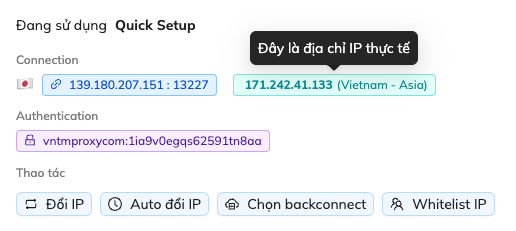
With many years of development experience, we are confident that the product delivered to our customers is a quality product. Praise is superfluous; please verify our Proxy product for yourself at:
Website: https://vn.tmproxy.com/
Conclusion: Understanding how each type of Proxy works and its uses is essential in modern life. We hope our article has been helpful to you. Goodbye and see you again!